Sumplete
Sumplete is a daily 5x5 number logic puzzle where you delete number cells so every row and column equals its printed target sum; the puzzle resets each day and is timed for speed and leaderboard placement.
Play SumpleteA fresh puzzle is waiting for you.
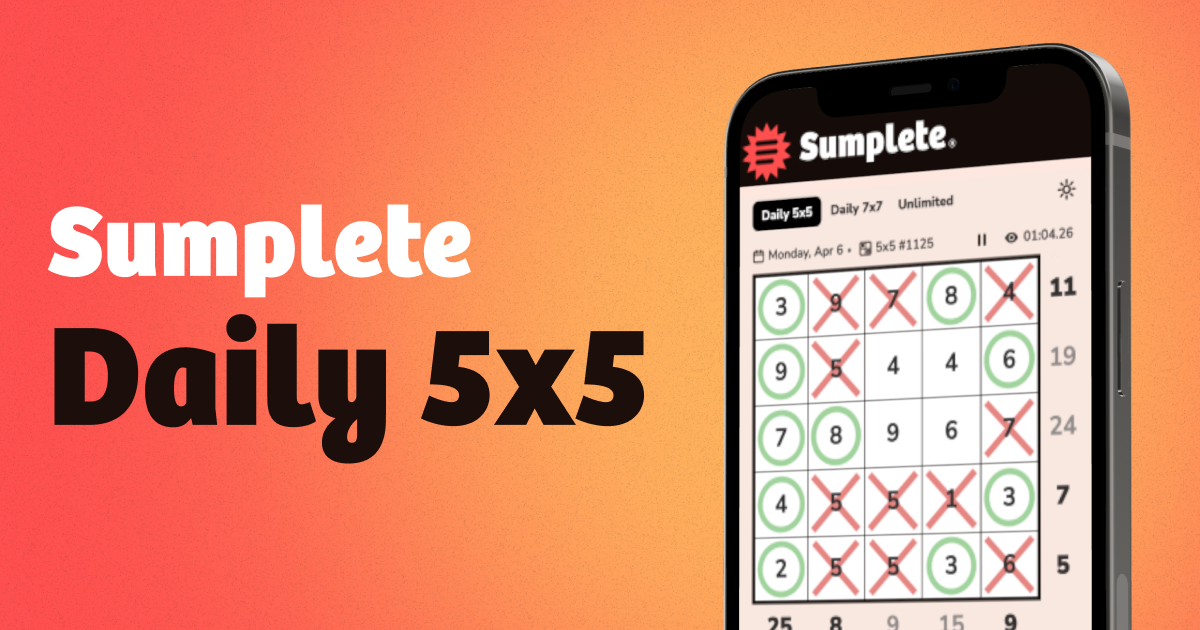
How to Play Sumplete Daily 5x5: Sumplete presents a 5x5 grid of numbers with sum clues at the right and bottom of the grid. Your objective is to delete numbers so each row and column adds up exactly to its target sum. Cells start unknown; tap a cell repeatedly to mark it deleted or kept, and completed rows or columns light up.
Sumplete offers a Daily 5x5 challenge focused on speed plus other modes for practice. There is a Daily 7x7 challenge and an Unlimited mode that lets you play grids from 3x3 up to 9x9 at adjustable difficulty. The site tracks solve times, streaks, and leaderboards, and a free account saves progress and unlocks the puzzle archive.
How to play Sumplete
- Open the Daily 5x5 grid and note the grey sum clues at the right and bottom of the grid.
- Tap a number cell once to mark it deleted with a red cross, twice to mark it kept with a green circle, and three times to return it to unknown.
- Use arithmetic to decide which cells must be deleted so each row and column equals its sum clue; a completed line will light up.
- Click a row or column sum clue to auto-mark remaining unknown cells that satisfy that clue, or click a zero sum to mark all cells as deleted.
- Work by small sum clues and corners first, re-scan the grid as marks change, and aim to improve your solve time.
Tips for Sumplete
- Scan sum clues to eliminate impossible cells quickly; if a single cell equals the row sum, mark it kept immediately.
- Start with corner cells because fixing corners constrains both a row and a column and often unlocks other placements.
- Prioritize smaller sum clues early; they require fewer kept cells and clear other possibilities for adjacent lines.
- Use the sum-clue click feature to auto-mark remaining cells for that line, especially useful on larger grids to save time.
- Use circles to mark definite keeps and crosses for deletes, and frequently re-scan rows and columns after each change.
Sumplete FAQ
What is Sumplete?
Sumplete is a free daily number logic puzzle in which you delete numbers from a grid so every row and column equals its printed target sum; the site describes it as inspired by Sudoku, Kakuro, and Hitori and offers timed Daily 5x5 and Daily 7x7 challenges plus Unlimited mode for practice.
How is the Daily 5x5 different from Unlimited mode in Sumplete?
The Daily 5x5 is a single shared challenge that resets every day and emphasizes solving as fast as possible; Unlimited mode lets you play many puzzles at any time in sizes from 3x3 up to 9x9 with adjustable difficulty for practice.
Is Sumplete free to play?
Yes, Sumplete is free to play; the site advertises free play on any device and offers optional free accounts to save win streaks, sync progress, and access the puzzle archive and leaderboards.
When does the new Daily 5x5 puzzle come out?
A new Daily 5x5 puzzle is released every day; the Daily 5x5 is described as a single challenge that resets daily so everyone solves the same grid each day.
Can you play past puzzles in Sumplete?
Yes, you can access past puzzles through the full puzzle archive when you create a free account; the archive lets you review previous puzzles and sync progress across devices.
Is there a hard mode in Sumplete?
Yes, Sumplete references a hard mode and provides a hard mode guide that covers tactics useful for larger grids; the guide is aimed at players seeking greater challenge on bigger sizes like 7x7 and beyond.
Does Sumplete work on mobile devices?
Yes, Sumplete works on any device; the site description explicitly notes that you can play free on any device, and the interface supports tapping to mark cells on touchscreens.
What do the colours and marks mean in Sumplete?
Blank means a cell is unknown, a red cross marks a cell as deleted, and a green circle marks a cell to keep; clicking a cell cycles through unknown, deleted, and kept, and completed lines light up when they match their sum clue.